 white
white 7分钟了解Tensorflow.js
| Get to know TensorFlow.js in 7 minutes | 7分钟了解Tensorflow.js |
Get to know TensorFlow.js in 7 minutesAnd learn how you can run ML/DL models directly in the browser
Photo by Irvan Smith on Unsplash An increasing number of developers are using TensorFlow in their machine learning projects. In March this year, the TensorFlow team at Google announced the arrival of the much-awaited JavaScript framework, TensorFlow.js (which was previously called DeepLearn.js).
Image Source : Tensorflow.js Website Now developers can build lightweight models and run them in the browser using JavaScript. Let’s understand what the need was for the development of this framework. |
7分钟了解TensorFlow.js 学习怎样在浏览器中直接运行ML/DL模型 越来越多的开发者在他们的机器学习工程中使用TensorFlow。今年3月,Google的TensorFlow团队发布等待多时的JavaScript框架,TensorFlow.js(之前也叫做DeepLearn.js) 现在开发者可以编译轻量级的模型并在浏览器中使用JavaScript运行它,那么就让我们来理解这款框架的开发需要什么。 |
HistoryBefore going to TensorFlow.js, I would like to start off with TensorFlow. TensorFlow was developed in 2011 at Google as their propitiatory library for Machine learning/Deep learning applications at Google. This library was open sourced in 2015 under the Apache License. TensorFlow is built in C++, which enables the code to execute at a very low level. TensorFlow has bindings to different language like Python, R, & Java. This enables TensorFlow to be used in these languages. So, the obvious question is: what about JavaScript? Conventionally, in JavaScript, ML/DL was performed by using an API. An API was made using some framework, and the model was deployed at the server. The client sent a request using JavaScript to get results from the server.
Client Server Architecture In 2017, a project called Deeplearn.js appeared, which aimed to enable ML/DL in JavaScript, without the API hassle. But there were questions about speed. It was very well known that JavaScript code could not run on GPU. To solve this problem, WebGL was introduced. This is a browser interface to OpenGL. WebGL enabled the execution of JavaScript code on GPU. In March 2018, the DeepLearn.js team got merged into the TensorFlow Team at Google and was renamed TensorFlow.js. Watch the below video for further details: TensorFlow.jsTensorflow.js provides two things:
Getting StartedThere are two main ways to get TensorFlow.js in your project: |
回顾 在介绍TensorFlow.js之前,我想先从TensorFlow开始。 TensorFlow在2011年开发于Google作为i他们的机器学习/深度学习app的API lib。这个API lib于2015年在Apache协议下开源。 TensorFlow由C++编写,这使得代码能够在底层运行。TensorFlow已同其他语言邦定在一起,如Python,R,Java。从而这些语言也能够作为TensorFlow的调用接口。 那么问题来了:关于JavaScript我们知道些什么呢? 在JavaScript中,ML/DL通过使用API接口来调用。使用这些框架来生成一个API,并在服务器上部署模型。客户端使用JavaScript发送一个请求从服务器中获取回复。 客户端服务器架构 在2017年,一个叫做DeepLearning.js的工程诞生了,旨在没有API的反烦扰下在JavaScript中推动ML/DL的发展。 但是有出现了速度的问题。都知道JS代码不能运行在GPU上。为了解决这个问题,引进WebGL。这是一个OpenGL的浏览器接口。WebGl能够在GPU上执行JS代码。 在2018年3月,DeepLearn.js团队与TensorFlow团队合并,重命名为TensorFlow.js。 更多内容请看下方视频 TensorFlow.js提供两样东西: CoreAPI,来处理底层代码 在CoreAPI之上编写的LayerAPI,通过增加层级的抽象性使coding更容易。 在你的项目中有两种方法引入TensorFlow.js |
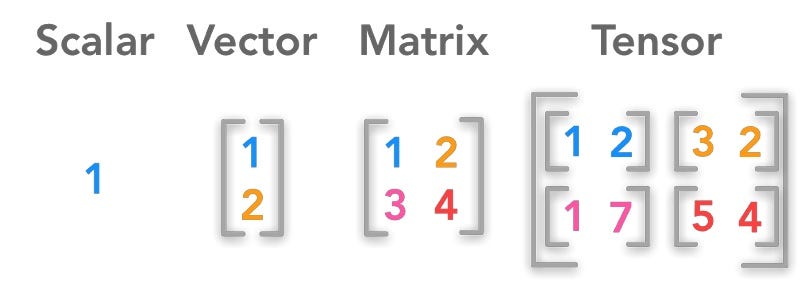
1. via <script> TagAdd the following code to an HTML file: 2. via NPMAdd TensorFlow.js to your project using yarn or npm. yarn add @tensorflow/tfjs npm install @tensorflow/tfjs In your main js file: import * as tf from '@tensorflow/tfjs'; CoreAPI1. TensorsSo, what is a Tensor ?
TensorFlow.js has utility functions for common cases like Scalar, 1D, 2D, 3D and 4D tensors, as well a number of functions to initialize tensors in ways useful for machine learning. Code Examplestf.tensor(): tf.scalar(): tf.scalar(3.14).print(); And so on… Watch the Below Video to get a deep insight into Tensors in TensorFlow.js: |
1. 通过<script>标签添加下列代码到一个HTML文件: 2. 通过NPM使用yarn或者NPM把TensorFlow.js添加到你的项目。 yarn add @tensorflow/tfjs npm install @tensorflow/tfjs 在你的主js文件: import * as tf from '@tensorflow/tfjs'; 核心API1. 张量(Tensors)所以,什么是张量?
代码示例tf.tensor(): tf.scalar(): tf.scalar(3.14).print(); |
2. Variables & OperationsTensors are immutable data structures. That means their values can’t be changed once they are set. However, Code sample: OperationsThere are various operations in TensorFlow.js. In order to perform mathematical computation on Tensors, we use operations. Tensors are immutable, so all operations always return new Tensors and never modify input Tensors. So Let’s look into some operations: tf.add() — Adds two tf.Tensors element-wise There are many operations in TensorFlow.js. You can check the documentation for other operations. I will demonstrate one more operation here: tf.matmul() tf.matmul() — Computes the dot product of two matrices, A * B. a.matMul(b).print(); // or tf.matMul(a, b) Watch the below video for deep insight into Variable and Operations: 3. Memory ManagementMemory management is the key in Machine Learning/Deep Learning tasks, because they are generally computationally expensive. TensorFlow.js provides two major ways to manage memory:
They both typically do the same thing, but they do it in different ways. tf.tidy() |
2.变量 & 运算
运算
3. 内存管理
tf.tidy() |
|
This executes the provided function
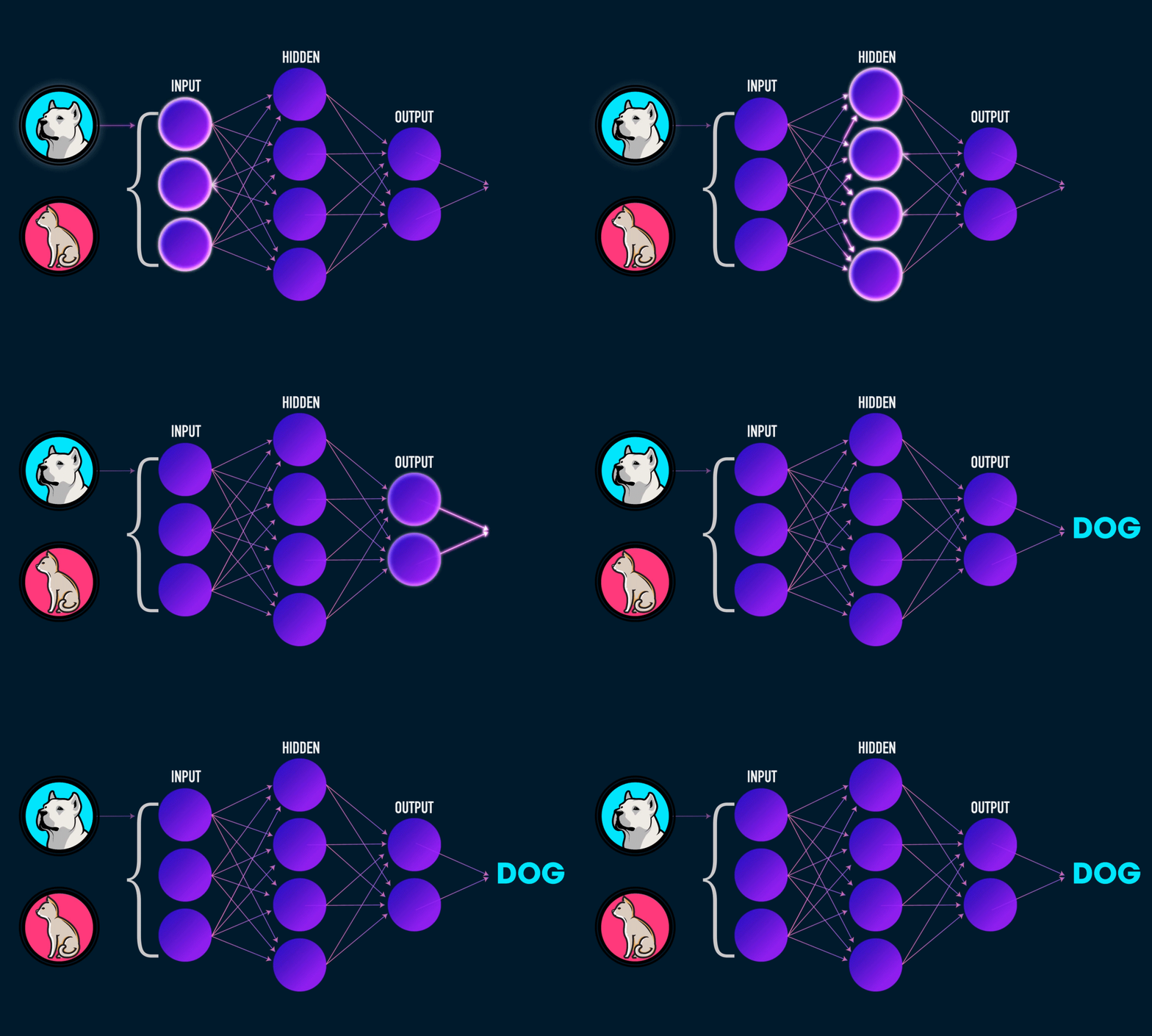
Code example: tf.dispose()Disposes any tf.Tensors found within the mentioned object. Code example: const two= tf.scalar(2); two.dispose() LayersAPILayers are the primary building block for constructing a ML/DL Model. Each layer will typically perform some computation to transform its input to its output. Under the hood, every layer uses the CoreAPI of Tensorflow.js. Layers will automatically take care of creating and initializing the various internal variables/weights they need to function. So, basically it makes life easier by increasing the level of abstraction. We will make a simple example feed forward network using the LayerAPI. The Feed Forward network we will build is as below:
Image is my own Code: |
代码示例: tf.dispose()const two= tf.scalar(2); two.dispose() LayersAPI
图是我自己的 代码: |
|
Index.html <html> <head> <title></title> <script src=”"> </script> <script src=”main.js” type=”text/javascript”></script> </head> <body> Tensorflow JS Demo </body> </html> main.js const model = tf.sequential(); //config for layer
const config_hidden = {
inputShape:[3],
activation:'sigmoid',
units:4
}
const config_output={
units:2,
activation:'sigmoid'
}
//defining the hidden and output layer
const hidden = tf.layers.dense(config_hidden);
const output = tf.layers.dense(config_output);
//adding layers to model model.add(hidden); model.add(output); //define an optimizer const optimize=tf.train.sgd(0.1); //config for model
const config={
optimizer:optimize,
loss:'meanSquaredError'
}
//compiling the model
model.compile(config);
console.log('Model Successfully Compiled');
//Dummy training data
const x_train = tf.tensor([
  [0.1,0.5,0.1],
  [0.9,0.3,0.4],
  [0.4,0.5,0.5],
  [0.7,0.1,0.9]
])
//Dummy training labels const y_train = tf.tensor([ [0.2,0.8], [0.9,0.10], [0.4,0.6], [0.5,0.5] ]) //Dummy testing data const x_test = tf.tensor([ [0.9,0.1,0.5] ]) train_data().then(function(){
console.log('Training is Complete');
console.log('Predictions :');
model.predict(x_test).print();
})
async function train_data(){
  for(let i=0;i<10;i++){
  const res = await model.fit(x_train,y_train,epoch=1000,batch_size=10);
   console.log(res.history.loss[0]);
  }
}
Output:
Watch the below videos for deep insight and code explanation: I understand that this is a small overview on the Tensorflow.js Library. I feel this can be a starting point before you read the documentation and go through some real world applications. I will be posting real world examples using TensorFlow.js as below: More Real world examples coming soon…Stay Tuned… My take on thisThis is excellent for coders who are familiar with JavaScript and are trying to find their way in the ML/DL world! It makes things a lot simpler for people coming from a non-ML/DL background, but who are looking to understand this field. The use cases for this are many, and I personally think it’s something we need at the moment. In my next article and video, I will talk about ML5 which is built over TensorFlow.js. ML5 is built at New York University and is under active development. What do you think about TensorFlow.js? Let me know in the comments section below. If you like this article, you would also like my Videos on Youtube. |
Index.html <html> <head> <title></title> <script src=”"> </script> <script src=”main.js” type=”text/javascript”></script> </head> <body> Tensorflow JS Demo </body> </html> main.js const model = tf.sequential(); //config for layer
const config_hidden = {
inputShape:[3],
activation:'sigmoid',
units:4
}
const config_output={
units:2,
activation:'sigmoid'
}
//defining the hidden and output layer
const hidden = tf.layers.dense(config_hidden);
const output = tf.layers.dense(config_output);
//adding layers to model model.add(hidden); model.add(output); //define an optimizer const optimize=tf.train.sgd(0.1); //config for model
const config={
optimizer:optimize,
loss:'meanSquaredError'
}
//compiling the model
model.compile(config);
console.log('Model Successfully Compiled');
//Dummy training data
const x_train = tf.tensor([
  [0.1,0.5,0.1],
  [0.9,0.3,0.4],
  [0.4,0.5,0.5],
  [0.7,0.1,0.9]
])
//Dummy training labels const y_train = tf.tensor([ [0.2,0.8], [0.9,0.10], [0.4,0.6], [0.5,0.5] ]) //Dummy testing data const x_test = tf.tensor([ [0.9,0.1,0.5] ]) train_data().then(function(){
console.log('Training is Complete');
console.log('Predictions :');
model.predict(x_test).print();
})
async function train_data(){
  for(let i=0;i<10;i++){
  const res = await model.fit(x_train,y_train,epoch=1000,batch_size=10);
   console.log(res.history.loss[0]);
  }
}
Output:
看下面的视频来加深理解和理解代码: 我理解 More Real world examples coming soon…Stay Tuned… 更多的实例即将出现...持续调整... 我所呈现的内容对于那些熟悉JavaScript并试图在ML/DL世界中一展拳脚的程序员来说这是极好的!
它帮助那些没有ML/DL背景却试图进入这一领域的人把事情变的更简单了。这样的例子很多,我个人认为这正是当前我们所需要的。
|



2. 若遇到资源下载链接失效,请及时通过联系站长QQ以获取补发。
3. 所有本站资源仅供学习和研究目的使用。用户必须在24小时内删除所下载的资源,并严禁将其用于任何商业活动。对于因违反此规定引发的任何法律问题及连带责任,本站及发布者不承担任何责任。除非特别注明为原创,本站资源大多来源于网络,版权归原作者所有。若有侵权,请联系我们以便进行删除处理。
4. 本站提供的所有下载资源(包括软件等),我们保证未进行任何负面修改(不包括为改善功能或修复bug等正向优化或二次开发)。然而,我们无法保证资源的准确性、安全性和完整性。用户下载后应自行判断。本站旨在促进学习交流,并不保证所有源码完全无误或无bug。用户应明白,除非特别注明,【雾码资源】对提供下载的软件等不持有任何权利,其版权属于相应合法拥有者。
5. 请您仔细阅读以上内容,购买即表示您同意以上所有条款。
雾码资源 » 7分钟了解Tensorflow.js